On-Page SEO works best when every important part of a webpage supports the same search intent. Adding a keyword to the title, H1, meta description, and image alt text is not enough if the page itself does not clearly solve the searcher’s problem.
A better approach is to optimize one page in a practical sequence: confirm its intent, align its core page signals, build useful content, strengthen contextual signals, and then verify what Google can actually crawl, index, and associate with the page.
Confirm the Page’s Intent Before You Optimize It
Before changing titles, headings, or keywords, decide exactly what the page is supposed to accomplish.
Start with the primary query you want the page to address and search it yourself. Look at the results Google is currently rewarding. Are they tutorials, service pages, product pages, comparison articles, category pages, or something else?
Then write the purpose of your page in one sentence:
This page exists to help [specific reader] understand or accomplish [specific task].
That sentence should control the rest of the optimization.
Also check whether another page on your website already targets essentially the same intent. Two URLs competing to solve the same search problem can create unnecessary overlap. In that situation, improving, consolidating, or repositioning an existing page may be better than creating another one.
Google’s people-first content guidance emphasizes creating substantial, useful content for people rather than publishing pages mainly to attract search traffic.
Set Up the Core On-Page SEO Signals
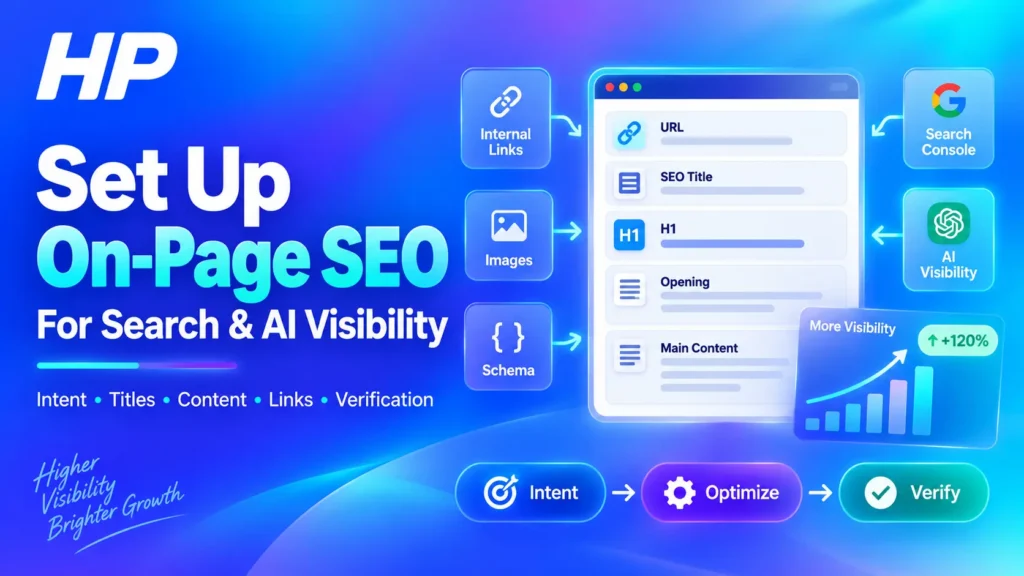
Your URL, SEO title, H1, opening paragraph, and main content should communicate the same page purpose without being copied word for word.
Use this alignment chain:
Search Intent → URL → SEO Title → H1 → Opening → Main Sections
For the URL, use something readable and descriptive. Avoid adding unnecessary words or changing an established URL only to insert another keyword.
For the SEO title, describe the page clearly and naturally include the main topic where it makes sense. Google recommends using language people search with in prominent locations such as the title and main heading.
Google may also use several sources when generating the title displayed in Search, including the HTML title, visible page headings, prominent text, and link text. The goal is therefore consistency, not mechanically identical wording.
Your H1 should make the page’s subject immediately clear to a visitor. It does not need to be identical to the SEO title, but the two should represent the same intent.
The opening paragraph should then confirm that the reader has reached the right page and explain what they will be able to accomplish.
Write a page-specific meta description as well. Treat it as a useful summary rather than a guaranteed search snippet. Google can generate a different snippet from visible page content when another passage better matches the query.
Build Content That Fully Solves the Searcher’s Need
Once the page identity is clear, focus on completing the reader’s task rather than reaching a particular keyword count.
Cover the important subtopics a reader genuinely needs. Use headings to organize meaningful stages or ideas, not every keyword variation you discover.
Add original value where possible through:
- practical instructions;
- first-party knowledge or expertise;
- useful examples;
- source-backed explanations;
- comparisons that help the reader make a decision;
- limitations and situations where an approach may not work.
Related terms can appear naturally when the topic is explained thoroughly. There is no need to create a separate page for every slightly different keyword variation.
This matters for AI-assisted search too. Google’s current generative AI guidance says normal SEO fundamentals remain relevant to AI Overviews and AI Mode. Google does not require special AI schema, forced content chunking, llms.txt, or a separate AI-only writing format for Google Search.
The practical goal is therefore not to write for an AI bot. It is to create a clear, original, accessible page that explains the subject well enough for both people and search systems to understand.
Strengthen the Page With Links, Images, and Relevant Structured Data
After the core content is strong, add supporting context.
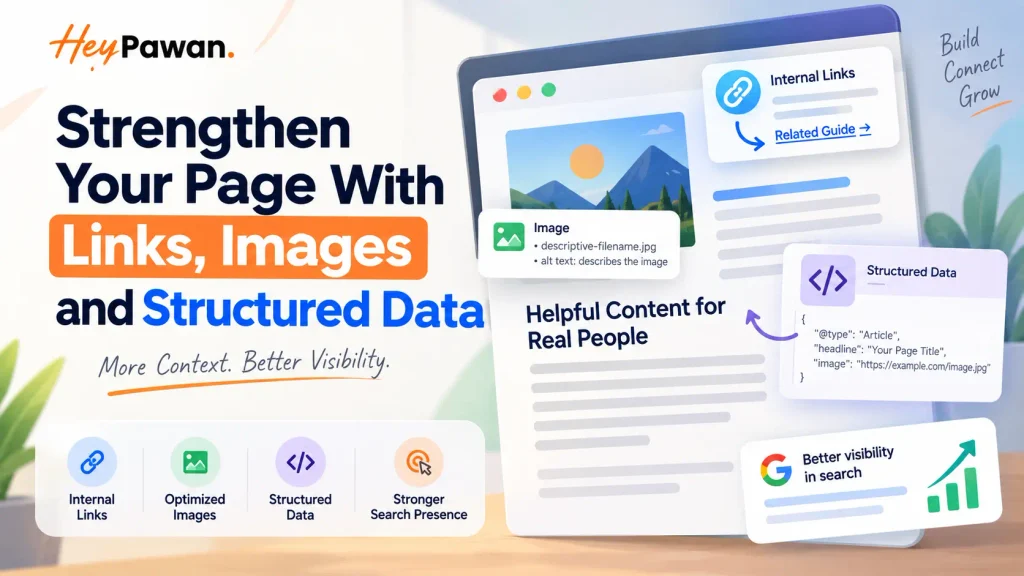
Internal links help users discover related information and help search systems understand relationships between pages. Link to the optimized page from relevant pages elsewhere on your site and use descriptive anchor text rather than repeatedly forcing the exact keyword.
Google recommends concise, descriptive link text and does not prescribe a fixed number of internal links.
Use external links when a credible primary source genuinely helps support a factual claim.
For images, place them near the content they support. Use useful filenames when practical and write alt text that describes the image’s purpose or content. Do not turn alt text into another location for keyword stuffing.
Structured data should be added only when an appropriate type accurately describes the visible page. Valid markup can make a page eligible for supported search features, but it does not guarantee that a rich result will appear.
Verify Your On-Page SEO Before and After Publishing
Implementation is not complete until you verify the live page.
Before Publishing
Review the page as a complete system rather than checking isolated fields.
Confirm:
- the SEO title and H1 support the same intent;
- the opening immediately establishes the page purpose;
- important sections are present in readable text;
- internal and external links work;
- images load correctly;
- no accidental noindex setting is present;
- the intended canonical is configured where relevant;
- structured data validates if you are using it.
Use Google’s Rich Results Test to validate supported structured data before relying on the markup.
After Publishing
Open Google Search Console → URL Inspection and enter the full published URL.
Review the indexed information to check whether the URL is on Google, whether crawling or indexing problems are reported, and which canonical Google selected after processing the page. Google’s live test cannot predict Google’s eventual canonical selection.
Then select Test live URL when you need to inspect the current version. For a successful live test, open View tested page to review the rendered HTML and, where available, the screenshot Google sees. This helps confirm that important content is actually present after rendering.
You can request indexing after an important new page or update, but submission is not proof that Google will index or rank it.
After Google has processed the page and performance data begins accumulating, use Search Console → Performance to inspect the page’s queries, impressions, clicks, and CTR.
The important question is not simply, “Did my SEO plugin give me a green score?”
Ask instead:
Is Google beginning to associate this page with the searches I intended to target?
If visibility in Google’s generative AI Search features matters to you, also open Search Console → Settings → Search generative AI and confirm the site is included in those features. Google currently uses this control for supported experiences including AI Overviews and AI Mode.
Where enough data exists, the Generative AI performance report can then show impressions from supported generative AI Search features and help identify which pages are receiving that visibility.
Troubleshoot When the Page Is Optimized but Visibility Does Not Improve
If the page appears properly optimized but visibility remains weak, do not immediately add the keyword more often.
Check the problem in this order:
- Is the URL indexed and eligible to appear in Search?
- Is Google selecting the expected canonical?
- Does another page on your site target the same intent?
- Does the current SERP still favor the type of page you created?
- Does your content fully solve the searcher’s need?
- Is Search Console showing the page for the queries you expected?
- Do relevant internal pages link to it?
- Could the real limitation be technical SEO, competition, backlinks, or site authority rather than the page itself?
This sequence prevents repeated title rewrites, unnecessary URL changes, and keyword stuffing when the actual issue exists elsewhere.
The most useful way to approach On-Page SEO is to treat optimization and verification as one process. Align the page first, make it genuinely useful, support it with clear contextual signals, and then use Search Console evidence to decide what needs improvement next.
If you manage your own website, this workflow can be applied one page at a time. If you need a broader review across multiple pages, technical issues, SEO, or AI-search visibility, you can explore Hey Pawan’s SEO & AI Search services. SEO & AI Search services
Frequently Asked Questions
Should I change an existing URL to improve On-Page SEO?
Not automatically. An established URL may already have links, indexing history, and search visibility. Change it only when there is a meaningful reason, and handle redirects and canonical signals correctly if the URL changes.
Do I need an SEO plugin to perform On-Page SEO?
No. An SEO plugin can make it easier to edit titles, meta descriptions, canonical settings, and structured data, but it cannot determine search intent, create useful content, build appropriate internal links, or verify actual performance for you.
Sources
- Google Search Central, People-First and Generative AI Optimization Guidance. Google generative AI optimization guidance
- Google Search Central, Search Essentials. Google Search Essentials
- Google Search Central, Title Links. Google title link guidance
- Google Search Central, Snippets. Google snippet guidance
- Google Search Central, Link Best Practices. Google link best practices
- Google Search Central, Structured Data Guidelines. Google structured data guidelines
- Google Search Console Help, URL Inspection. Google URL Inspection documentation
- Google Search Console Help, Search Generative AI Control. Google Search generative AI control
- Google Search Console Help, Generative AI Performance Report. Google Generative AI performance report