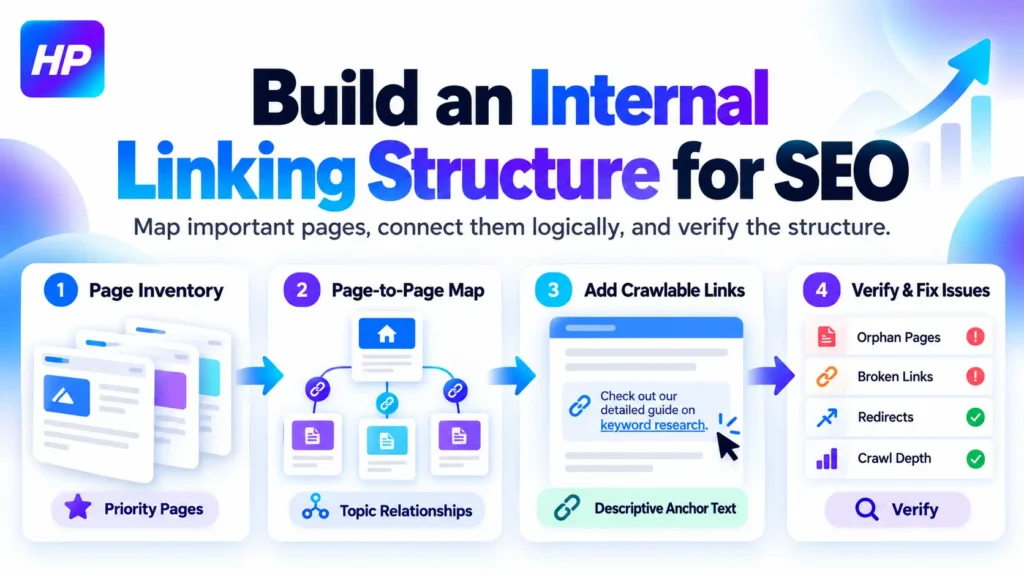
A strong Internal Linking Structure for SEO is not created by adding a random number of links to every blog post. It starts with deciding which pages matter, how those pages relate to one another, and which routes should help visitors and search engines move through the website.
Google recommends making important pages reachable through links from other pages and using descriptive anchor text that explains the destination. The practical goal is therefore to build a page-to-page network that is logical, useful, crawlable, and easy to verify.
Before starting, make sure you have access to your website or CMS and a list of the main URLs you want to evaluate. A spreadsheet is enough for the mapping stage. SEO tools can make verification easier, but they are not required to build the structure.
Start With a Page Inventory and Decide Which Pages Matter Most
Do not begin by opening random blog posts and adding links. First, create a working list of the pages that should participate in your internal linking structure.
For a small website, you can collect URLs from your navigation, blog archive, CMS, and XML sitemap. For a larger website, using a crawler can make the inventory easier.
Assign each useful page a practical role, such as:
- core service or product page
- hub, category, or broader topic page
- supporting informational article
- supporting commercial page
- utility or low-priority page
Next, mark the pages that matter most.
A core service page, for example, may deserve stronger internal support than an old announcement with little ongoing value. A detailed guide may also be important because several related pages need to reference it.
The objective is not to give every page the same number of links. It is to make sure important pages have sensible paths from other relevant areas of the website.
Google recommends creating a logical site structure and linking important pages from other relevant pages. Google’s sitelinks and site structure guidance
Successful completion of this stage should leave you with a manageable URL list in which every priority page has a clear purpose.
Build an Internal Linking Structure for SEO With a Page-to-Page Map
The most practical way to build an Internal Linking Structure for SEO is to decide the page relationships before editing the website.
Group pages according to genuine topic and user relationships. A broad guide may naturally lead to a more detailed article. That detailed article may link back to the broader resource when a reader needs more context. An informational article may also link to a relevant service page when that service is a logical next step.
Avoid creating a connection simply because two pages contain similar keywords.
For every priority page, answer two questions:
Incoming: Which relevant existing pages should help visitors reach this page?
Outgoing: Which useful related pages should someone be able to reach from this page?
Then create an internal link map. Your working spreadsheet can record the source URL, source role, target URL, target role, relationship, anchor direction, implementation status, and verification status.
A simple publishing example looks like this:
| Source Page | Target Page | Why the Link Exists |
| Broad SEO guide | Detailed internal linking article | Gives the reader a deeper explanation |
| Detailed article | Broader topic hub | Provides wider context |
| Informational article | Relevant service page | Offers a logical next step |
This approach is more useful than deciding that every page needs three, five, or ten links.
Google states that every page you care about should have a link from at least one other page on your site, but it does not specify a magical ideal number of links. Google Link Best Practices
Do not force every article to link to a service page, and do not connect every page in a topic group to every other page. The finished map should represent useful paths for real visitors.
Add Crawlable Links With Clear, Natural Anchor Text
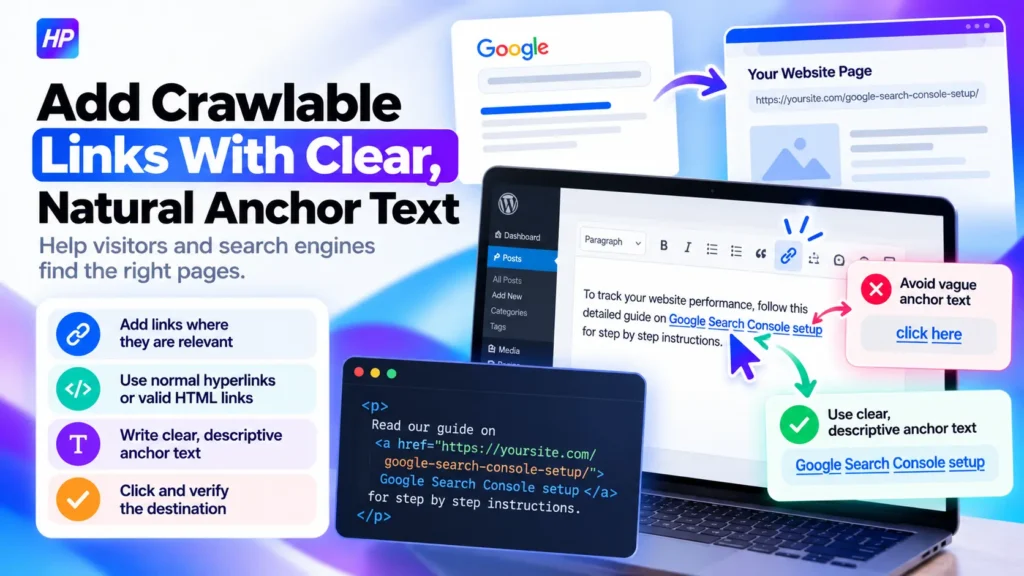
Once the map is ready, implement the planned connections inside the relevant pages.
Open the source page in your CMS and find the sentence or section where the destination would genuinely help the reader. Add the link there rather than placing it in an unrelated sentence just because a target keyword happens to appear.
For important internal connections, use normal CMS hyperlinks or valid HTML links containing an <a> element with an href. Google identifies this as the standard crawlable link format. Google’s crawlable-link guidance
Anchor text should clearly describe the destination.
Instead of a vague phrase such as click here, use wording such as Google Search Console setup when that accurately describes the page being linked.
If you are working on the page itself before strengthening its internal connections, my existing guide explains the broader on-page process. How to Set Up On-Page SEO for Search and AI Visibility
Do not create artificial anchor-text ratios or force an exact keyword into every link. Google recommends descriptive, reasonably concise anchor text and specifically advises writing it naturally rather than stuffing keywords into it. Google Link Best Practices
After adding a link, click it yourself. Confirm that the correct page loads and that the destination genuinely helps someone reading the surrounding paragraph.
Check for Orphan Pages, Broken Links, Redirects, and Unnecessary Depth
After implementing the planned links, check for structural problems that can leave important pages difficult to reach.
An orphan page has no normal internal path leading to it. Finding one does not automatically mean you should add a link.
First decide whether the page still belongs in the website’s normal search and user journey. A valuable service page or guide may need a relevant incoming link. An obsolete, duplicate, test, or temporary page may require a different action.
Also check links that point to missing or outdated destinations. If an internal link leads to a 4xx URL, update it to the correct live page or remove it when no appropriate replacement exists.
A crawler such as Screaming Frog can help identify internal 4xx destinations and the pages linking to them. Screaming Frog’s internal 4XX guidance
Redirects deserve a similar review. If an internal link still points to an old URL that redirects to a current page, update the source link to the final destination when practical. Screaming Frog’s internal redirect guidance
Crawl depth can also reveal problems, but avoid applying an arbitrary universal click limit. Ask a more useful question:
Is an important page unnecessarily difficult to reach compared with its importance?
If it is, look for a relevant higher-level or related page that can provide a more direct path.
Verify the Internal Linking Structure Before You Finish
Internal linking is not complete when the links are merely inserted. The final step is verifying that the live website matches the structure you planned.
Start manually. Open your mapped source pages and confirm that:
- the intended link is present;
- the anchor text makes sense;
- the destination is correct;
- the target page loads successfully;
- the connection is genuinely useful in context.
For a larger website, run another crawl and compare important URLs with your map. Review incoming links, outgoing links, response codes, redirects, and crawl depth.
Google Search Console provides an additional Google-specific check. Open the Links report, review Internal links → Top linked pages, and select a target URL to inspect which other pages Google reports as linking to it.
Do not use this as your only audit. Google explicitly states that its Links report is not a comprehensive list of every link and may omit URLs. Google Search Console Links report documentation
For an especially important URL, URL Inspection can provide information about Google’s indexed version, crawl status, canonical information, and current accessibility. A successful live test confirms that Google can access the current page under the tested conditions, but it does not guarantee indexing. Google URL Inspection documentation
If you have not configured Search Console correctly yet, use my dedicated setup tutorial rather than turning this internal-linking task into a Search Console setup project. How to Set Up Google Search Console the Right Way
A useful final check is:
Priority page → relevant incoming path → crawlable link → descriptive context → correct destination → verified
An XML sitemap does not replace this structure. Google says it can usually discover important pages when they are properly linked, while a sitemap provides an additional discovery mechanism and does not guarantee that every listed URL will be crawled or indexed. Google’s sitemap guidance
If your site has hundreds or thousands of URLs, legacy redirects, overlapping content, or important pages buried inside a complicated architecture, I can help with a broader crawl and page-mapping review as an independent digital marketing professional. SEO and AI Search services from Pawan Kumar
Frequently Asked Questions
Should old blog posts link to newly published pages?
Yes, when the newer page gives readers useful information that is genuinely related to the older article. Updating relevant older content can also create an incoming path to a new priority page.
Do internal links need a dofollow attribute?
No special dofollow attribute is required for a normal link. Standard crawlable links generally do not need a qualifying rel attribute unless there is a specific reason to handle the link differently.
Are breadcrumbs considered internal links?
Yes. Breadcrumbs that connect pages within the same website are internal navigation links. They can support hierarchy and navigation, but they do not replace useful contextual connections between related pages.
Do image links count as internal links?
An image can function as an internal link when it links to another page on the same website. Google can use the image’s alt attribute as anchor text, so linked images should have descriptive alt text that reflects their purpose. Google Link Best Practices
What if no existing page provides a relevant link to an important page?
Do not insert an unrelated link simply to remove the problem. First check whether the page belongs under a suitable hub, category, navigation path, or related content section. If no logical relationship exists anywhere on the site, reconsider whether the page fits the current architecture or whether supporting content is actually missing.
Sources
Google Search Central: Link Best Practices
Google Search Central: Sitelinks and Site Structure
Google Search Central: Sitemaps Overview
Google Search Console: Links Report
Google Search Console: URL Inspection Tool