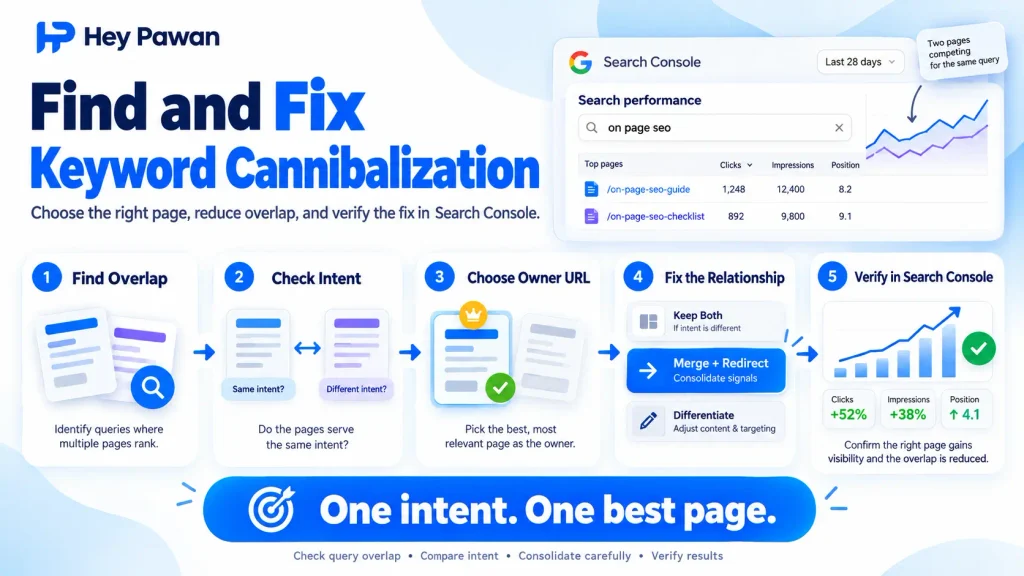
If several pages on your website appear for the same search query, do not immediately delete, merge, or redirect one of them. The first step to Fix Keyword Cannibalization is confirming that the pages actually compete for the same search intent and that the overlap creates a problem.
Two URLs can rank for similar searches and still serve different purposes. The practical goal is to identify genuine overlap, decide which page should own the intent, make the least destructive change, and then verify that Google is responding as expected.
Confirm Whether You Actually Have Keyword Cannibalization
Multiple URLs appearing for one keyword are not automatically a cannibalization problem.
Before changing anything, check four things:
- Query overlap: Are multiple URLs appearing for the same or closely related searches?
- Intent overlap: Do those pages satisfy essentially the same searcher need?
- Page-purpose overlap: Could one page largely replace the other without changing what the visitor gets?
- Performance problem: Is an unintended page receiving visibility, are very similar pages competing, or would consolidation clearly produce a stronger single resource?
For example, a guide about conducting an SEO audit and a page offering professional SEO audit services may share terminology but serve different intent. They may both deserve to exist.
Two articles that both teach essentially the same SEO audit process are a stronger cannibalization candidate.
This distinction matters because consolidating pages with useful independent search intent can remove rankings and traffic that were not causing a problem in the first place.
Find the Competing URLs in Google Search Console
Google Search Console provides a practical first-party way to find candidate URLs.
Open Performance → Search results, then:
- Open the Queries tab.
- Select or filter the query you want to investigate.
- Switch to the Pages tab.
- Review which URLs received impressions or clicks for that query.
- Record the URLs that appear to serve the same purpose.
Look across a meaningful date range rather than diagnosing a site from one day of data.
You can also use a Google search such as site:example.com “topic” to discover other potentially relevant pages, but do not treat this as a complete index of your website. Google states that the site: operator does not necessarily return every indexed URL.
SEO platforms can help surface multiple ranking URLs at scale, but an automated cannibalization label is still only a reason to investigate. It is not the final diagnosis.
If Google Search Console is not configured yet, use my guide to set up Google Search Console correctly before relying on this workflow.
Choose Which Page Should Own the Search Intent
The intended URL should be the page that best satisfies the searcher’s need and makes sense as the long-term destination for that topic.
Do not simply keep whichever URL currently has the highest average position.
Compare the competing pages using this order:
- Search-intent fit: Which page most directly solves the target query?
- Independent value: Does either page satisfy another useful search intent that should be preserved?
- Existing performance: Compare relevant clicks, impressions, and query coverage.
- Business purpose: A commercial service or product page may need to stay separate from an informational article.
- Links: Check whether one URL has valuable backlinks or much stronger internal-link support.
- Long-term suitability: Prefer a stable URL that logically fits the site’s structure and topic.
Before deleting or redirecting anything important, record the current page and Search Console performance. That gives you a baseline for checking what changed afterward.
How to Fix Keyword Cannibalization Based on the Situation
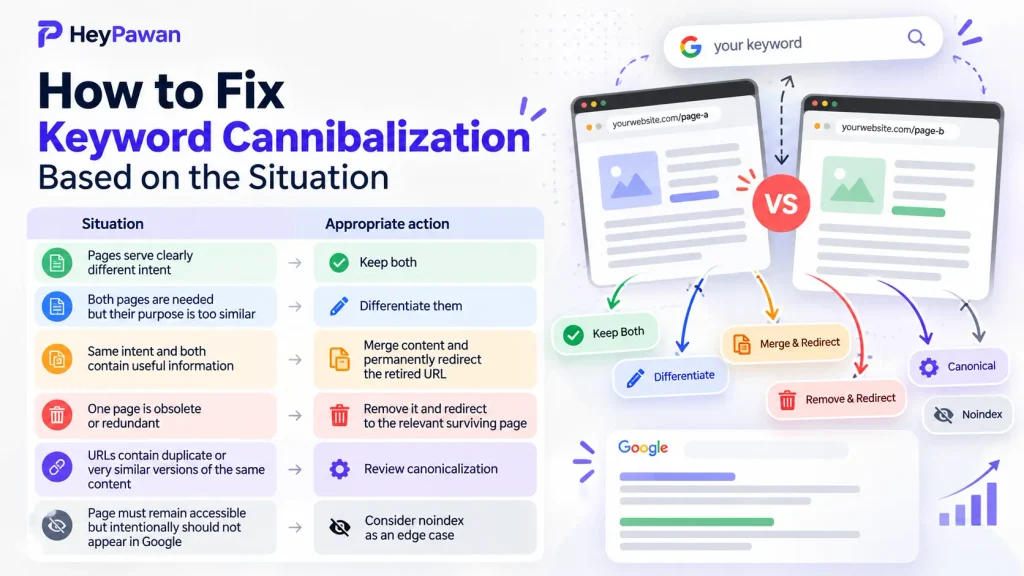
To Fix Keyword Cannibalization, choose the treatment that matches the relationship between the pages rather than applying the same solution to every case.
| Situation | Appropriate action |
| Pages serve clearly different intent | Keep both |
| Both pages are needed but their purpose is too similar | Differentiate them |
| Same intent and both contain useful information | Merge content and permanently redirect the retired URL |
| One page is obsolete or redundant | Remove it and redirect to the relevant surviving page |
| URLs contain duplicate or very similar versions of the same content | Review canonicalization |
| Page must remain accessible but intentionally should not appear in Google | Consider noindex as an edge case |
If you keep both pages, make their purposes clear enough that each provides distinct value.
If you differentiate them, assign each URL a separate primary intent and adjust the title, H1, main coverage, and relevant internal-link anchors accordingly. For a complete page-level workflow, see my guide to on-page SEO for search intent and visibility.
If you merge two pages, preserve valuable unique information from both, publish the stronger consolidated version on the URL you want to retain, and permanently redirect the retired URL to it. Google recommends permanent redirects when a page has permanently moved.
Do not use a canonical tag simply because two independent articles target similar keywords. Google uses canonicalization to choose a representative URL among duplicate or very similar pages.
Likewise, noindex is not a general cannibalization shortcut. Use it only when a page genuinely needs to remain accessible but should not appear in Google Search. The URL must remain crawlable for Google to see the noindex directive.
Clean Up the SEO Signals After the Fix
After choosing the surviving URLs, make the rest of the website support that decision.
For pages you merged or retired:
- change relevant internal links so they point directly to the surviving URL;
- remove obsolete redirected URLs from the XML sitemap;
- update navigation or contextual references where necessary.
For pages you kept and differentiated, review internal anchor text so the links describe each page’s separate purpose instead of treating both URLs as interchangeable.
For canonicalized URLs, confirm that your signals do not conflict. Avoid combinations such as pointing a canonical toward a URL that is unavailable or unintentionally excluded from indexing.
Google recommends descriptive internal links because they help both users and Google understand the destination page. Google also recommends including in a sitemap the URLs you prefer to appear in Search.
Verify That the Cannibalization Fix Worked
Do not consider the job finished just because you changed a page or added a redirect.
First verify the implementation itself.
If you redirected a URL, open the old address and confirm it reaches the correct surviving page.
For an important retained URL, open URL Inspection in Search Console and review Google’s indexed information. If canonicalization is involved, check the user-declared canonical and Google’s selected canonical rather than assuming Google accepted your preference.
Then return to Performance → Search results, filter the original query, and inspect the Pages tab again over time.
Look for:
- clearer visibility for the intended URL;
- disappearance or reduction of unwanted competing URLs;
- clicks and impressions for the target query;
- preservation of useful traffic from other queries.
Do not judge the result only from average position, and do not expect every signal to change immediately. Google needs time to recrawl and process important page changes.
If the wrong URL continues appearing, check whether another competing page exists, whether internal links still favor the wrong URL, whether the redirect works correctly, whether the intended page is indexable, and whether Google selected a different canonical.
Finally, maintain a simple keyword-to-page map so new content does not unknowingly recreate an intent already owned by another URL.
If you have a larger website with many overlapping URLs and it is difficult to decide what should be kept, merged, redirected, or repositioned, I provide direct SEO support as an independent digital marketing professional. I can review the page relationships, Search Console evidence, internal links, and technical signals together before important URLs are changed.
Frequently Asked Questions
Does keyword cannibalization only happen between blog posts?
No. It can involve blog posts, service pages, product pages, category pages, landing pages, or other URLs when they substantially compete for the same search intent.
Can a new page cannibalize an older page?
Yes. Publishing a newer URL that covers essentially the same intent can create overlap with an established page. Compare both pages before deciding whether the newer one should be differentiated, consolidated, or removed.
Can location pages look like keyword cannibalization?
Yes, especially when regional pages contain very similar content. Do not automatically merge legitimate country, language, or regional variants. Their international targeting and canonical or hreflang setup may justify separate URLs.
Do I need a paid SEO tool to find keyword cannibalization?
No. Google Search Console is enough to begin investigating important queries and the URLs receiving visibility for them. Paid SEO tools are useful when you need to review many keywords or pages at scale.
Should I change a page’s URL when fixing cannibalization?
Not automatically. If an existing URL already fits the intended topic and can be retained, changing it adds unnecessary migration work. Change or retire a URL only when there is a clear structural or strategic reason.
Sources
- Google Search Console Help: Performance report and query/page analysis. Performance report overview
- Google Search Central: permanent and temporary redirects. Redirects and Google Search
- Google Search Central: canonicalization and duplicate URLs. What is canonicalization?
- Google Search Central: blocking indexing with noindex. Block Search indexing with noindex
- Google Search Central: internal-link best practices. Link best practices for Google
- Google Search Central: sitemap guidance. Build and submit a sitemap
- Ahrefs: determining when multiple ranking URLs are actually harmful. What is Keyword Cannibalization?