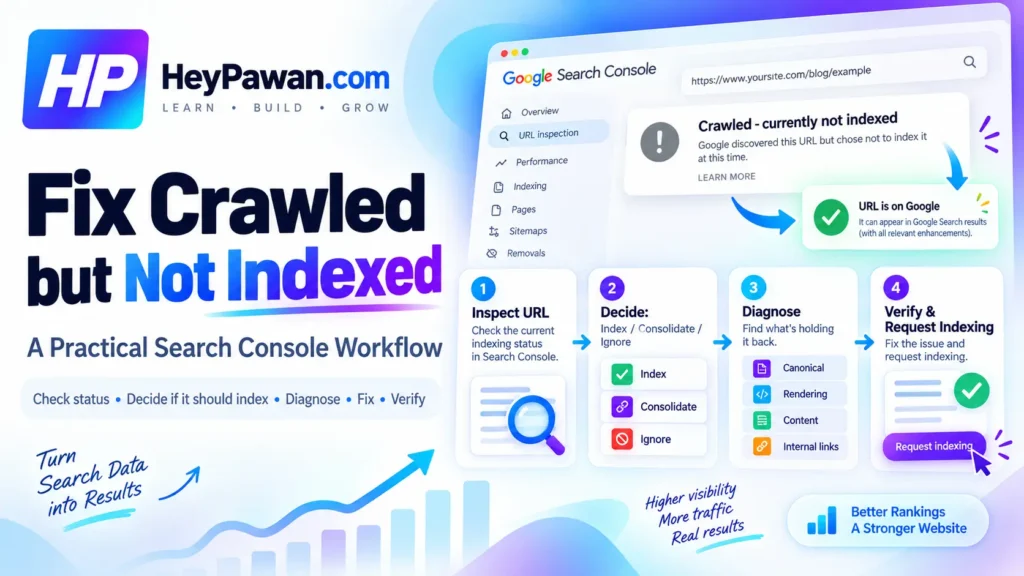
Seeing Crawled but Not Indexed in Google Search Console does not automatically mean your page is broken. Google has already crawled the URL, but it has not currently added that page to its index.
The right workflow is to confirm the URL’s real status, decide whether the page should be indexed, diagnose the evidence, fix only the relevant issue, and then verify both the live page and Google’s later indexing decision.
Crawled but Not Indexed: What Does This Status Actually Mean?
Google Search Console’s official status is Crawled – currently not indexed. It means Google crawled the page but has not indexed it at this time. Google also notes that the page may or may not be indexed later and that you do not need to resubmit it for crawling simply because this status appears.
This is not automatically a penalty, a technical error, or proof that the content is low quality. Google does not index every URL it discovers. Duplicate versions, filters, parameters, redundant archives, and other URLs may not need their own place in search.
Your goal is not to get every URL indexed. Your goal is to make sure the important canonical pages on your site can be indexed correctly.
Confirm the URL’s Real Indexing State Before You Change Anything
Open Google Search Console, inspect the complete URL with URL Inspection, and review Google’s indexed information before editing the page.
Check:
- Whether the URL is currently indexed.
- The last crawl information.
- Whether indexing is allowed.
- The user-declared canonical.
- Google’s selected canonical, when available.
If you changed the page after Google’s recorded crawl, select Test live URL. Google lets you switch between Google Index and Live Test results.
Keep those two views separate. The live test tells you whether Google’s inspection crawler can currently access and process the page. It does not guarantee that Google will index the URL, and it cannot predict Google’s final canonical selection.
Before Fixing Crawled but Not Indexed Pages, Decide Which URLs Need Indexing
Classify each affected URL before trying to fix it.
INDEX: Keep pursuing indexing when the URL serves a distinct search purpose and provides a useful standalone result, such as an important service, product, category, location, or informational page.
CONSOLIDATE: If another URL serves substantially the same purpose, compare the two. The correct action may be to merge content, redirect a superseded URL, or clarify canonical signals rather than trying to index both.
DO NOT PURSUE INDEXING: Some filtered URLs, parameter URLs, redundant archives, utility pages, and other unnecessary variations do not need independent search visibility.
This step turns a large Search Console list into a smaller set of URLs that genuinely require investigation.
How to Diagnose an Important Page That Google Crawled but Did Not Index
Once you know the URL deserves separate indexing, diagnose it in a fixed order.
Check Similar Pages and Canonical Signals
Compare the affected URL with pages covering the same intent. Look for nearly identical service or product pages, URL parameters, category or archive duplicates, and an incorrect canonical.
Review the declared canonical and, when available in indexed data, Google’s selected canonical. Google can group duplicate or very similar pages and choose one representative URL.
Check What Google Can Actually Render
For JavaScript-driven pages, select Test live URL, then open View tested page when necessary. Check whether Google can see the main content, important headings, links, and other elements required to understand the page.
Google uses rendered HTML when processing JavaScript content. If important content is missing from that rendered output, fix the rendering or template issue before making unrelated SEO changes.
Check Whether the Page Adds Distinct Search Value
Do not add words just to reach an arbitrary length.
Instead, ask whether the page solves a distinct search need, provides information that nearby pages do not, and is complete enough to satisfy the visitor’s purpose. If another page already performs the same job better, differentiation or consolidation may be more appropriate than expansion.
Google specifically states that it does not have a preferred word count.
Check Internal Links and Sitemap Signals
Important pages should receive relevant crawlable internal links from appropriate pages on your site. Also confirm that an index-worthy URL is represented consistently in your sitemap when appropriate.
A sitemap can help Google discover and revisit URLs, but it does not guarantee crawling or indexing.
If many similar URLs share this status, inspect a representative sample first. A template, canonical configuration, duplicate pattern, rendering problem, or weak site structure may be creating the issue across the entire group.
Fix the Actual Problem, Then Verify the Live Page
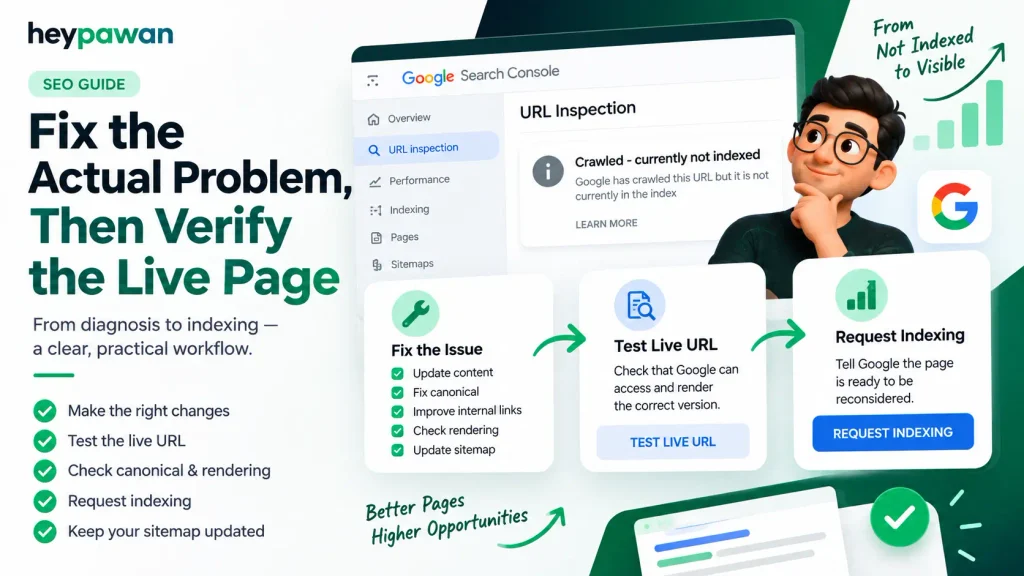
Make only the changes supported by your diagnosis. Depending on the evidence, that may mean differentiating useful content, merging overlapping pages, redirecting a superseded URL, correcting a canonical, fixing rendered content, adding relevant internal links, adjusting sitemap membership, or repairing a shared template.
Then run Test live URL again.
Confirm that the current version exposes the intended content, canonical declaration, indexing directive, and rendered output. This is the first verification layer: is the live implementation now correct?
If you made a meaningful correction to an important individual URL, you can then select Request indexing. The request tells Google that the page is ready to be reconsidered, but it does not guarantee inclusion in the index.
For many changed URLs, keep the sitemap accurate rather than manually requesting every page.
What If the Page Is Still Not Indexed After the Fix?
Return to URL Inspection and perform the second verification layer: has Google’s indexed state changed?
Check whether Google has crawled the updated version, whether another URL is still being treated as the canonical, and whether the same problem affects other pages built from the same template. If necessary, reconsider whether the URL genuinely deserves a separate search result.
Do not keep requesting indexing for an unchanged URL. Correct implementation improves eligibility, but Google does not guarantee that every technically indexable page will enter the index.
If important pages across a whole section remain affected after meaningful corrections, a broader technical SEO review may be useful. As an independent digital marketing professional, I can help investigate Search Console evidence, canonical conflicts, rendering, internal linking, and template-level indexing problems.
Frequently Asked Questions
How long can Crawled but Not Indexed last?
There is no guaranteed deadline. Google says indexing after a request can take time and may take longer in some cases. Recheck the indexed state rather than assuming a specific number of days means the fix failed.
Can robots.txt or a noindex directive cause this exact status?
Search Console has separate reporting reasons for blocked crawling and pages marked noindex. If you recently changed those settings, use Test live URL to confirm that the current page is crawlable and indexing is allowed before relying on older report data.
Can Google’s Indexing API force a normal page into the index?
No. Google’s Indexing API is not a general indexing shortcut for ordinary webpages. Google currently limits it to pages with JobPosting or qualifying livestream BroadcastEvent markup.
Sources
- Google Search Console Help: Page indexing report Page indexing report
- Google Search Console Help: URL Inspection tool URL Inspection tool
- Google Search Console Help: Inspect and troubleshoot a single page Single-page troubleshooting
- Google Search Central: Canonicalization Canonicalization documentation
- Google Search Central: JavaScript SEO basics JavaScript SEO basics
- Google Search Central: Sitemaps Sitemap overview
- Google Search Central: Creating helpful, reliable, people-first content People-first content guidance
- Google Search Central: Indexing API Indexing API documentation